Ever stared at a blank webpage and thought, “What am I even doing?” Yeah, us too. That’s why we created TheContent Compass—your trusty guide for writing web content that doesn’t drift off into the Bermuda Triangle of Confusion. It’s like GPS for your page builds: keeps you on course, provides tips and latest web news, helps you avoid jargon potholes, and politely reminds you that “Click Here” isn’t an inspiring call to action.
After a productive stretch in Information Technology, the UTC Web Development Team has returned to Communications and Marketing—and they’re unpacking their laptops, caffeine habits, and years of tech wisdom like seasoned travelers coming home from a long adventure.
During their time in IT, the team gained valuable experience in infrastructure, security, and all the behind-the-scenes wizardry that keeps UTC’s technical systems humming. Now, reunited with the storytelling side of campus, they’re blending web tech precision with marketing’s creative spark to deliver faster, smarter, more accessible web experiences.
The reunion has already sparked fresh energy across departments—code meeting content, function meeting flair. It’s less a return and more a homecoming tour, where everyone’s bringing their best skills to the same table.
So, cue the fanfare (and maybe a little confetti): the Web Dev Team is back in Marketing, ready to bridge creativity and technology—one well-coded, beautifully branded webpage at a time.
*Boomer Lesson:The Traveling Wilburys was a legendary 1980s rock supergroup made up of George Harrison, Bob Dylan, Tom Petty, Roy Orbison, and Jeff Lynne. Think of them as the OG collab crew — before Spotify playlists or TikTok remixes and long before “collabs” were a thing.
Byte-Sized Briefs
Students Wanted: Three Open Spots. One Great Team.
The Web Team is looking for three shining stars to join the team as Student Web Content Editors. These behind-the-scenes semi-pros keep utc.edu from turning into a digital attic worthy of Storage Wars, making sure pages stay polished, links behave, and requests don’t drift off into the internet void.
No previous experience? No problem. We’ll provide all the training, plenty of support, and a few good laughs along the way. Plus, it’s a great line for any resumé—nothing says “attention to detail” like helping run a university website.
If you know a student with a sharp eye, steady hand, and just the right dose of perfectionism (the kind who alphabetizes their apps on their phone for fun), send them our way!
A PDF Walks Into a Website…
What’s up with PDFs? It seems like everyone’s got one! During our big website migration, we discovered departments have been uploading PDFs like Oprah giving out cars—“You get a PDF! You get a PDF!” The trouble is, 1) most aren’t accessible (we’re fixing that) and 2) there are just so many of them. Old flyers, outdated forms, 10-page syllabi from 2012… it’s a digital yard sale out there. So, we’re cleaning house! Before uploading your next document, take a quick look at our guide on when to use PDFs, how to keep file sizes small, and how to make them accessible: Uploading PDFs to the Website.
Making the Web So Accessible, Even Your Mamaw’s Screen Reader Is Applauding
Yo, the Web Accessibility Task Force has been out here workin’! We got every www editor trained up in Silktide—so now folks actually know what “alt text” is. No more mystery images named “final_final_reallythisone_108.jpg”.
We also teamed up with the Walker Center and threw down with those Making PDFs Accessible with Adobe Acrobat sessions. Man, the crowd showed up! You’d think we were giving away Beyoncé tickets.
Now we’re coming for blog.utc.edu editors—don’t hide! We just want your sites to play nice with everyone.
And after that, we’ll be checking every third-party thing UTC uses, just to make sure nobody’s out here breaking accessibility laws.
Mark your calendars, folks—on Thursday andFriday nights, November 20-21, 2025, www.utc.edu and blog.utc.edu are getting a little spa treatment. (blog.utc.edu gets pampered on Thursday so we don’t clash with the Chancellor’s Investiture Ceremony on Friday.) We’re talking fresh updates, fewer glitches, and hopefully no one accidentally deleting the homepage. Just remember: anything added to the test site during maintenance will disappear faster than your motivation on a Monday morning.
So, if you’ve been working hard on new pages, save them on the live site or stash them somewhere safe before the 21st. Pro tip: make unpublished pages on the live site, then publish them on the test site after we’re done playing digital mechanic.
Want the full IT maintenance schedule? Go check out the 2025 lineup—it’s like a rock tour, but with more patching and fewer guitars.
The Great Web Roundup: When WordPress Rode into Drupal Country
Well, partner, on October 25, we saddled up and pulled off another big move — blog.utc.edu finally rode into the same hosting sunset as www.utc.edu. After years of livin’ on different ranches (servers, if you’re fancy), these two digital cowpokes are now together at last! Cue the tumbleweed and triumphant harmonica.
Back in the day, WordPress and Drupal each had their own patch of land. WordPress handled the blog posts; Drupal wrangled the main site. But keeping ’em on separate servers was like herding cattle with two different maps…and lots of dust.
So our trusty web wranglers rustled up a plan: move both to the same hosting corral. And boy, did that pay off.
Why We Hitched ’Em Together
Less Wranglin’: One server means fewer updates, fewer rodeos, and less duplicatin’ of effort.
Faster Horses: Shared caching and resources make both sites gallop faster than a jackrabbit on espresso.
Stronger Fort: Centralized security keeps the outlaws (hackers) at bay.
Slimmer Ledger: Consolidation at a lower cost — that’s more gold in the digital saddlebag.
Happy Crew: Devs and editors now ride side by side, makin’ content smoother than Tennessee whiskey.
The Afterparty
Since the move, both sites have been purrin’ like a well-fed mountain lion — faster load times, fewer hiccups, and a whole lot less fixin’. It’s a cleaner, meaner, leaner setup for everyone.
The Big Picture
This wasn’t just movin’ code around — it was a full-on web frontier alliance. One vision, one server, one unstoppable posse.
Next on the trail? go.utc.edu — so saddle up, partner. The digital prairie awaits!
Code, Coffee, and a Whole Lotta Collaboration: UTC’s Open Source Camp Rocks Chatt
The University of Tennessee at Chattanooga sure knows how to throw a camp—just swap the tents and bug spray for laptops and coffee! On November 7–8, UTC co-hosted Open Source Camp Chattanooga 2025 with ChaDUG (Chattanooga Drupal Users Group), turning the campus into a buzzing hive of tech folks, creatives, and caffeine-fueled problem-solvers. Friday’s all-day workshops dove into Drupal, WordPress, and Laravel, while Saturday’s sessions kept the energy high with real-world accessibility demos, friendly banter, and more acronyms than a government memo.
It wasn’t your typical conference—it was part family reunion, part tech jam session. Huge thanks to Chris Gilligan, Weston Gentry, David Wood, Brian Rogers, Steven Shelton, Natalie Wright, and Drew Schurr from UTC and Lee Walker and Bernardo Martinez from ChaDUG for helping make the magic happen. Folks left smarter, connected, and maybe just a little sleep-deprived—but already asking, “When’s the next one?” (Hint: start charging your laptops now—you won’t want to miss next year!)
The Family Tree of Navigation: Sidebar Menus Reveal Their Roots
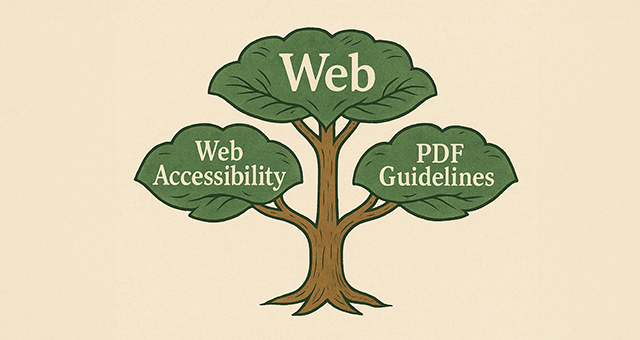
The UTC website just got a little more ancestral. Our sidebar navigation now proudly shows a page’s “parent” link when you’re viewing one of its “children”—because every good family deserves to stay connected.
Before this update, wandering deep into a department’s pages felt a bit like showing up at a family reunion and forgetting how you’re related to anyone. You could visit “Web Accessibility,” but finding your way back to “Web” required detective work (or a helpful button our Web Dev Team duct-taped in years ago).
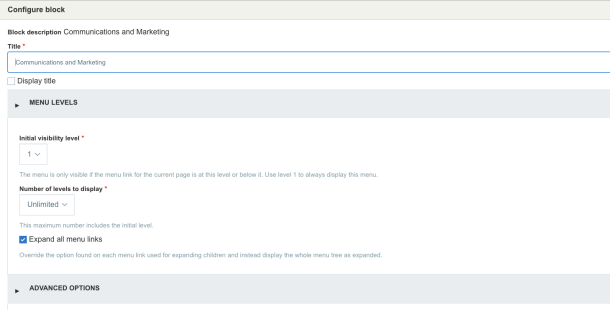
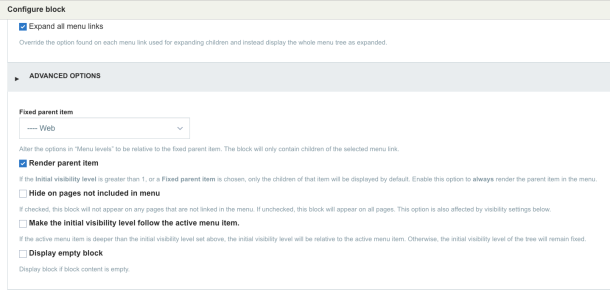
Now, thanks to the new “Render parent item” option in the Menu Block’s Advanced Settings, the family ties can be on full display. When you’re on a child page like Web Accessibility, you’ll see its proud parent, Web, perched above it—styled in UTC’s signature dark blue and gold like a polished nameplate in the family tree. (More visual refinements are on the way before year’s end to make navigation even smoother and more accessible.)
It’s a simple change with big benefits: visitors can see exactly where they are, how the pages are related, and how to climb back up the digital family branch without getting lost in the woods.
How to Implement It
While in “Layout” mode, in the first region where you would place the sidebar menu, click “Add block”.
Under “Menus” in the righthand sidebar, add the desired menu as you normally would.
In the next window, open “Menu Levels” and check “Expand all menu links”.
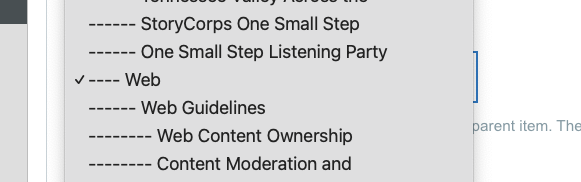
Open “Advanced Options” select your parent menu link in the “Fixed parent item” select box.
Next, check “Render parent item”, then add your block. Voilà!
The Bigger Picture
This update is part of UTC’s ongoing effort to make the website more intuitive, accessible, and user-friendly for students, faculty, staff, and visitors. As the site continues evolving toward the Drupal 11 platform, these improvements help ensure that every click feels more connected and purposeful.
Say It with Pictures… and Words: The Art of Alt Text
You’ve heard the saying, “A picture’s worth a thousand words,” right? Well, not if your Wi-Fi flakes out or you’re using a screen reader. Then it’s worth exactly zero—unless you’ve added alt text, that magical little sentence behind the scenes that makes your image make sense.
Alt text isn’t just about checking the “accessibility” box—it’s about storytelling. It’s what helps everyone, regardless of how they browse, understand what’s going on in your image. Think of it as your picture’s secret narrator.
Here’s how to write it like a pro (and not like a robot):
Say what’s there if it’s important. Got text in the image? Add it. Don’t leave your audience guessing.
Keep it short and sweet. One or two sentences should do it—this isn’t the next Great American Novel.
Skip the “image of…” Screen readers already announce that part, so save yourself the redundancy.
Focus on what matters. Describe what gives the image meaning or context—don’t waste time detailing every blade of grass.
Done right, alt text turns your visuals into a more inclusive story—so everyone gets the full picture, even when the picture’s not there. Examples:
Helpful Alt Text
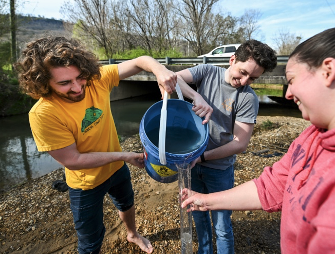
Alt text: Students outdoors by a river with two students pouring a blue bucket of water into a clear cylinder held out by a third student.
Unhelpful Alt Text
Alt text: Picture of students pouring water from a bucket.
Alt Text: Three students outdoors with a card driving over a bridge in the background with a male student in a yellow shirt and no shoes working with another male student in a gray shirt pouring water out of a blue bucket into a long clear cylinder held by a female student in a pink hoodie.
If you have questions or want to discuss alt text, you can reach out to us for more information.
Editor Spotlight: April Cox
For more than two decades, April Cox, Director of Creative Services in the Division of Enrollment Management and Student Affairs, has played a pivotal role in how the university presents itself to the world. Within EMSA, Cox collaborates with departments across campus to market and promote their programs, events, and student resources—while also designing creative content that inspires prospective students to fall in love with UTC.
Reflecting on her long career, Cox recalls the early days of the web with enthusiasm. “Since the very first website I saw in 1999, we have come a very long way,” she said. “I still remember my excitement when I had the opportunity to help design UTC’s first robust website and later transition into our first Content Management System.”
From those early beginnings to today’s sophisticated online experience, Cox has been instrumental in UTC’s digital evolution. “It’s been a privilege to have a hands-on role as our site has grown, expanded, and evolved—strengthening UTC’s presence in its most visible channel,” she shared.
Her work blends creativity with precision, whether she’s researching how other universities manage their web presence or making a simple edit to correct a typo. “I’m always eager to learn more about our website and to help create a presence that serves prospective students and their families, as well as employees and current students,” Cox said. “Maintaining a website is no small task, but I’ve always enjoyed supporting what I believe is our most powerful marketing tool.”
After 26 years at UTC, Cox finds deep satisfaction in the results of her efforts. “It’s deeply rewarding to see how our collective work translates into a better experience for every visitor,” she said.
Through her dedication, innovation, and passion for communication, April Cox continues to ensure that UTC’s digital presence reflects the excellence, energy, and spirit of the university community.
Whether you’re a seasoned editor or just getting started, The Content Compass is your trusted guide for making every webpage the best it can be.
Feel free to reach out to us if you have any feedback! We look forward to hearing from you. In the meantime, happy editing!
New Federal Accessibility Rule: What It Means for Content Editors
On April 24, 2024, the U.S. Department of Justice finalized a new digital accessibility rule. This rule requires all state and local government websites and mobile apps to meet the Web Content Accessibility Guidelines (WCAG) 2.1, Level AA. For the UT System, this means all campuses—including UTC—must be in full compliance by April 24, 2026.
At the University of Tennessee at Chattanooga, our compliance plan is built around more than just checking boxes. We’re committed to making our digital spaces usable for everyone. Accessibility ensures equal opportunity for all users, reduces legal risk, and improves clarity and usability for everyone.
Training Update
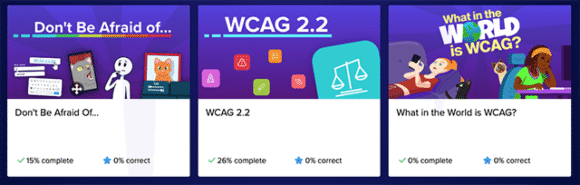
Most of you have already completed accessibility training in Silktide. However, due to the expanded federal requirements, we have added three new online training videos in addition to the existing three. They are Don’t be Afraid of…, WCAG 2.2, and What in the World is WCAG? Please set aside time to complete these courses at your earliest convenience.
Deadline: All training must be finished by December 31, 2025, in tandem with UT System’s annual compliance requirements.
Key Focus: Accessibility applies not only to web pages but also to PDF documents. Every public-facing PDF must meet WCAG 2.1 AA standards. Over the years, thousands of PDFs have been uploaded to UTC websites, and we are now conducting a full inventory. We need your help to determine which files can be removed or archived, which must be updated for compliance, and—ideally—which could be converted into accessible web pages (this option is strongly encouraged). Archived PDFs do not need remediation, but they must include a clear “archive” label and URL indicator.
Additionally, this fall, we are partnering with the Walker Center for Teaching and Learning to provide live PDF accessibility training, offered in addition to the Silktide training webinars. The sessions will be presented online through Zoom, with three different dates and times available for your convenience. You only need to attend one session, and each will include time for Q&A. Training options available are as follows (choose one that you are interested in):
Vendor Sites: Content editors must also review the accessibility compliance of any vendor-managed websites or platforms they use. If you work with a vendor site, notify the Accessibility Task Force so we can track compliance and provide support. In addition, you will need to include a disclaimer on your pages when linking to 3rd-party content. The disclaimer should notify users that while UTC has made every effort to ensure accessibility, the university cannot guarantee full accessibility for information provided by external vendors.
Example: Disclaimer: This page contains links or embedded content from a third-party vendor. The University of Tennessee at Chattanooga has made every effort to ensure the accessibility of this content. However, because the material is hosted and maintained by an external provider, UTC cannot guarantee that all aspects meet WCAG 2.1 AA standards. If you encounter any barriers to access, please contact [email protected] for assistance.
Your active participation ensures UTC stays ahead of the federal deadline and equips you with the knowledge to apply accessibility standards in your daily content work.
To support these efforts, UTC has formed a new Accessibility Task Force made up of personnel from across multiple campus units. This cross-functional team will help coordinate compliance, provide guidance, and ensure consistent progress toward meeting WCAG 2.1 AA standards.
Each content editor will be connected with a Task Force member. They will reach out to you directly to discuss your role in compliance, answer questions, and help identify accessibility improvements in your area. This ensures that responsibility is clear, support is available, and no one is left navigating accessibility requirements alone.
(Items in red indicate that UTC Content Editor attention is needed.)
Clarify requirements: Review DOJ guidance and WCAG 2.1 AA standards.
Accessibility Task Force: A cross-campus team to lead compliance efforts.
Defined roles: Clear accountability for IT, faculty, staff, and communications.
Campus-wide policiesapplied: Accessibility built into all digital processes.
Training and communication: Workshops and updates for editors and stakeholders.
Full inventory: Catalog all websites, apps, documents, videos, and PDFs.
Testing and fixes: Automated scans + manual reviews to uncover and resolve issues.
Vendor checks: Ensure 3rd-party tools also meet WCAG standards and disclaimers are posted.
User testing: Partner with the Signal Center to validate improvements with real users.
Ongoing oversight: A new Accessibility Subcommittee within the Web Governance Council will keep accessibility a permanent focus.
Why This Matters to You as a Content Editor
Your role is critical. Accessibility isn’t just a developer task. Editors ensure headings, alt text, links, and documents are clear and usable.
Compliance is shared. Everyone who creates or updates content helps UTC meet these standards.
Better experience for all. Accessible content isn’t just for people with disabilities—it makes sites clearer and easier for everyone to use.
Benefits for the University
Equal opportunity and access for all users
Reduced legal and compliance risks
Improved usability and digital experience
Stronger culture of accountability and collaboration
Next Steps: Complete the required training in Silktide, including the three new videos, by December 31, 2025. Choose one of the PDF online training sessions presented by the WCTL and add it to your calendar. Expect outreach from your assigned Accessibility Task Force representative in the coming months. Begin improving your site with the recommendations made in Silktide. Review PDFs uploaded to your site for archiving, remediation, or webpage conversion. Small actions now will help us stay ahead of the April 2026 deadline.
Contact the UTC Web Team for assistance if you have any questions.
WordPress Blog Migration to Cloud Servers: NEW DATE! Fri., Sept. 26, Sat., Oct. 25, 2025
On Fri., Sept. 26, Sat., Oct. 25, 2025, UTC will migrate all WordPress sites from onsite servers to new cloud-based servers. This affects ALL blog.utc.edu websites. This upgrade is part of our ongoing efforts to improve reliability, security, and performance for all university websites.
Moving to cloud hosting means our sites will benefit from:
Better stability – less downtime and faster recovery if problems occur.
Improved performance – faster page load times for visitors.
Stronger security – more frequent updates, patches, and monitoring.
Scalability – the ability to handle larger spikes in traffic (such as during enrollment or emergencies).
What Content Editors Need to Know
Content Freeze: Do not make edits between 8 a.m., Oct. 25 through 8 a.m. on Oct. 26. Any edits during this time may be lost.
Drafts: Publish or securely save important drafts before October 25.
Media Files: Images, PDFs, and other uploads will migrate automatically. Still, double-check your site after the migration to confirm everything displays correctly.
Plugins and Themes: The Web Team has reviewed and tested current plugins and themes. If you notice unexpected behavior, report it immediately.
Faster Updates: After migration, plugins and security patches will be applied more frequently, improving site security.
Accessibility Reminders: Migration will not “fix” accessibility issues. Continue adding alt text, using proper headings, and reviewing links as you update content.
What Happens Next
After migration, content editors will be asked to:
Log in and confirm you can access your site(s).
Review key pages for formatting, links, and media.
This migration positions UTC’s websites for long-term growth and stability. By moving to the cloud, we reduce risk of outages, improve performance for site visitors, and strengthen the security of our digital content.
Learn on demand through the Professional Development Library! Full access included with membership paid by UT System.
The UTC Web Team want to let you know about an excellent resource: Digital Collegium’s 2025 Accessibility Summit webinars. As a part of the UT System, all employees have free membership available through UTK, which would normally cost $195/yr per person.
These Digital Collegium webinars will give you practical tips to make your content clearer, more accessible, and legally compliant. By applying what you learn, you’ll help strengthen our university’s brand and ensure everyone can access information without barriers. Some of Digital Collegium’s webinar offerings of interest are as follows:
May 31, we celebrated the big and successful move of our www.utc.edu to our new hosting environment, which was officially launched May 30. (Woohoo!) [Throw confetti here.]
Next in line, we’ll be moving our blog.utc.edu as well as some smaller applications to that same new host. This not only brings improved performance and reliability, it reduces costs and time with maintenance tasks. The blog is tentatively scheduled for migration by Sept. 26, 2025. Be on the lookout for updates as that date draws near!
UTC to Co-Host 2025 Chattanooga Open Source Camp – and You’re Invited!
The UTC Web Team is excited to team up with ChaDUG (Chattanooga Drupal Users’ Group) to co-host the 2025 Chattanooga Open Source Camp — formerly known as Drupal Camp Chattanooga — on Sat., Nov. 8, 2025.
This annual event brings together developers, designers, editors, marketers, and anyone curious about the web to learn, share, and connect around Drupal, WordPress, and open source tech. And this year, we’re expanding the focus beyond Drupal to celebrate all open source platforms — because, as the camp theme goes, “We are all better together.”
Best of all? It’s completely FREE for all UTC students and employees.
Who Should Attend?
Web Developers
Designers & Creatives
Digital Marketers
Content Editors
Anyone looking to start a career in web or tech
What to Expect:
60+ attendees from across the U.S.
15+ workshops and sessions on everything from design to development
Full-day trainings for WordPress and Drupal
Average November temps in Chattanooga? A comfy 62°F
Free lunch, snacks, coffee, and even a snazzy camp t-shirt
A fun after party to mingle, swap stories, and grow your network
Whether you’re a seasoned pro or just curious about open source, this is a welcoming, high-energy event you won’t want to miss.
Registration is not yet open but forthcoming. Mark your calendars and be on the lookout for updates!
Scheduled Maintenance – Friday, July 25 We’ll be performing maintenance on both www.utc.edu and blog.utc.edu on Friday evening, July 25, 2025. Keep in mind: any updates or content added to the test site will be overwritten during this process. If you’re working on pages, make sure to save your changes on the live site or back them up elsewhere before the 25th.
Suggestion: Create unpublished page(s) on the live site, then after maintenance publish it (them) on the test site.
Go here to review IT’s 2025 maintenance windows, including web.
Menu Access Questions We’ve seen a few tickets about users not being able to edit menus or breadcrumbs.
Here’s how it works: Menu access is granted at the college level—not the department level. So, if you’re a content editor with full access to your college’s entire site, you’ll be able to manage menus and breadcrumbs. But if your access is limited to a specific department or section, you can create and update pages, but not modify the menu.
Log-out Glitch for Editors Some editors have noticed they appear to be logged out after making an edit. This is just a display bug—it hasn’t actually logged you out, but we know it’s annoying. A fix is in the works and will roll out during the next maintenance window. The glitch doesn’t affect public users or site visitors—just content editors.
Faculty Bios – Who Manages What? We’ve had several tickets about updating faculty biographies. Here’s the scoop: The content on the faculty/staff pages is managed in Drupal. But if you click a “More Info” button on a faculty card, that information comes from Digital Measures—not Drupal. Each faculty member is responsible for updating their own Digital Measures profile. If you need help figuring this out, submit a ticket and we’re happy to assist.
UTC IT is deploying a new enterprise generative AI platform that gives employees access to multiple leading AI models including OpenAI’s ChatGPT, Anthropic’s Claude, and Mistral AI. The platform operates entirely within UTC’s network boundaries, protecting your data. (Note: While this tool maintains strong security controls, it is not currently approved for sensitive, confidential, or regulated data.) This unified interface allows users to select their preferred AI model. As this new tool rolls out, the IT team encourages you to share feedback about their use cases and experiences through the built-in feedback button. Your insights about how you’re using the AI platform will help shape future improvements.
The platform can be found by visiting https://chatt.utc.edu/. It is currently only available when connected to the campus network or by VPN.
Content Tip: Add a News Widget!
The UTC News Widget automatically pulls the latest stories from the UTC News blog directly into our website, keeping content fresh and relevant without having to manually update. Designed to showcase campus achievements, research breakthroughs, student success, and more, the news widget is filtered by specific programs, colleges, or topics—making it easy to deliver targeted news to different audiences. It’s an effective way to keep prospective students, families, and community members engaged with the exciting things happening at UTC, while also connecting current students, faculty, and staff with updates on programs, people, and activities across campus. If you’re interested in integrating the UTC News Widget onto your department’s webpage, please reach out to the Web Team here.
Editor Spotlight: Bryan Wootan
As a Graphic Designer and Web Design Specialist in the College of Engineering and Computer Science, Bryan Wootan plays a key role in developing print materials, social media graphics, and web pages to promote the college’s degree programs. His work supports events, recruitment, and communication efforts across the college. He also helps coordinate the promotion of major regional events such as the Technology Symposium and the Spring Research and Arts Conference—both of which give students a chance to showcase their work to local industry leaders.
What Bryan enjoys most about being a content editor is the collaborative spirit of UTC’s editing and development team. He describes the group as thoughtful, responsive, and always willing to tackle challenges together—whether that means working through technical limitations or brainstorming creative solutions. [Awe, thanks, Bryan! Right back atcha!] Over time, he has built strong working relationships across departments, fostering a sense of community that makes the work both easier and more rewarding.
One of the most meaningful aspects of Bryan’s role has been helping shape parts of the UTC website that have gone on to influence the university’s broader digital presence. Knowing his design and development work has a global reach is especially fulfilling. He also values the opportunity to contribute beyond the College of Engineering, collaborating with talented colleagues across campus. The creativity, professionalism, and shared commitment to excellence continue to inspire him every day.
Fun fact! Bryan’s been shaping the digital face of UTC for seven fabulous years—and he’s just getting started. Keep an eye out… you never know where his next pixel-perfect idea will show up!
Whether you’re a seasoned editor or just getting started, The Content Compass is your trusted guide for making every webpage the best it can be.
Feel free to reach out to us if you have any feedback! We look forward to hearing from you. In the meantime, happy editing!
The Editor’s Edge: News, Tools & Tricks to Keep Your Website Sharp
Welcome to the second edition of The Content Compass! As we work together to enhance the university’s web presence, your commitment to creating accurate, accessible, and compelling content is more important than ever. Let’s continue to showcase the excellence of our campus community through every page we publish.
Big changes are on the horizon! Our new hosting environment for www.utc.edu officially launches May 30, bringing improved performance and reliability.
IMPORTANT! Beginning at 8 a.m. onFri., May 30, 2025, through Sat., May 31, 2025, editors will NOT be able to log in to the website to make any changes as the site will be locked for migration purposes. However, if there are any important edits that need to be made during that time, you can submit a ticket here and our team will make those for you after migration is complete.
Byte-Sized Briefs
If Content Is King, Then Communication Is The Crown. In our endeavor to build-up our web community, the UTC Web Team recently inaugurated a UTC Website Knowledge Base blog to share how-tos, updates, and best practices. Watch for new posts each month and please feel free to send us some suggestions!
Enhancing Media File Management: As of the last deployment, the Web Dev Team implemented the Media Replace and Media Delete modules in Drupal to offer greater control and flexibility for site administrators. Media Replace allows users to update the underlying file of a media entity—such as swapping out an outdated image or PDF—without breaking existing references to that media item throughout the site. This streamlined workflow simplifies media updates and helps maintain content integrity across pages. With Media Delete, users can cleanly remove media entities along with their associated files, preventing clutter and unused assets from accumulating in the media library. Together, these modules support better media lifecycle management for Drupal websites. To learn more on how to use these modules, please visit our Knowledge Base Article here.
Silktide Training Must Be Completed By May 30! As part of our ongoing efforts to improve the quality of content on our platform, weʼve rolled out important training videos for Silktide. This tool will be key in helping us maintain high standards across our content, and it’s essential that all Content Editors complete the training by May 31, 2025, as Acquia Optimize services will end on 6/2/2025. For more information, please go here.
Building Better Connections: We’re in the early stages of developing a new university intranet, and to guide this process, we’re forming an Intranet Review Committee led by Senior Director of Marketing, Sally Halloran. This committee will evaluate potential platforms to ensure our internal web content is organized and aligned with the needs of our campus community. Their recommendations will help shape the foundation of a more effective and user-friendly intranet experience. Stay tuned for upcoming communications as the committee begins its work and shares findings.
Stronger Together: New Council Forming To Oversee Web Strategy. The Web Management Team is in the process of establishing a Website Governance Council, which will replace the Web Steering Committee, to help guide the strategic direction, consistency, and quality of our web presence. This cross-functional group will include representatives from key departments and is responsible for enforcing standards and ensuring alignment with institutional goals. By implementing this governance structure, we aim to foster more coordinated, efficient, and user-focused web management across all university sites.
Welcome Aboard, Kevin!
With over 20 years of experience, Kevin Tugman, UTC’s new Director of Creative Services in Communications and Marketing, is a creative problem-solver who specializes in turning great ideas into powerful content and engaging user experiences. He will help guide the next phase of our web design evolution, scheduled for release in 2026.
Known as a go-to partner for breaking through creative roadblocks, he brings fresh perspectives to even the most complex projects. His sweet spot lies in bridging design, strategy, and storytelling to craft content that truly connects. Whether helping teams overcome challenges or elevating creative approaches, Kevin is dedicated to making great things happen. As a proud UTC alumnus, he is always cheering—Go Mocs!
Please join us in giving Kevin a warm welcome!
Good file management is like good housekeeping…
…no one notices it until it’s missing.
As we move to our new host environment, the UTC Web Team is evaluating file storage and making some adjustments and recommendations. Storing large files directly on a website consumes valuable server space and can dramatically slow down page load times, leading to a poor user experience and lower search engine rankings. They also increase the risk of timeouts and errors, particularly for users on mobile devices or with limited bandwidth. From a long-term perspective, large files make site backups and migrations more cumbersome and can contribute to higher hosting costs. Keeping file sizes lean and storing bulky content in appropriate external platforms helps ensure your website stays fast, efficient, and easy to manage. Here are some tips for managing your files:
Images
When using Photoshelter, please download images at either the Medium (1200px) or Small (600px) size for uploading to the main site’s media library.
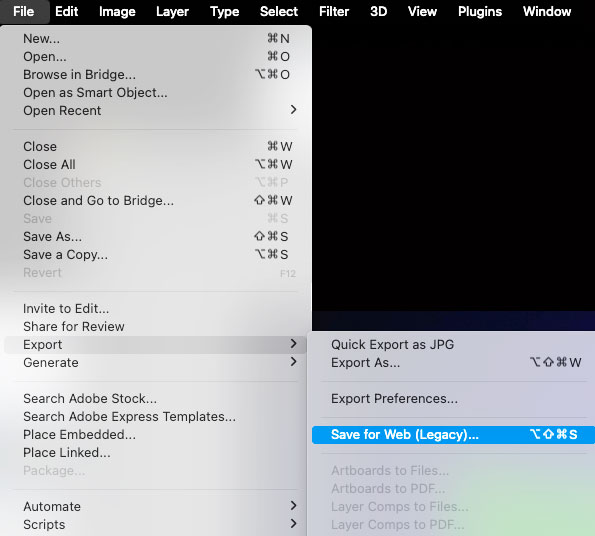
For AdobePhotoshop, ensure your images are 72 dpi and no larger than 1200px in width. To optimize them for the web, go to File > Export > Save for Web (Legacy). In the dialog window, select “High” quality. This will balance image quality with faster load times for the web.
Optimizing your PDF helps reduce file size, improve load time, and ensure better accessibility. To optimize a PDF, remove unnecessary images or compress them, limit embedded fonts, and reduce the overall file size using export or compression tools. Additionally, make sure the PDF is accessible by tagging headings, adding alt text to images, and using clear document structure. A well-optimized PDF not only loads faster but also improves usability, searchability, and compliance with accessibility standards. Follow these steps to make your PDF web-ready:
Step 1: Open Your PDF
Launch Adobe Acrobat Pro.
Open the PDF file you want to optimize.
Step 2: Use the PDF Optimizer Tool
Click File > Save as Other > Optimized PDF.
This opens the PDF Optimizer window.
Step 3: Choose What to Optimize
In the PDF Optimizer window, you can control compression and remove unnecessary data:
Images: Downsample and compress images (e.g., use JPEG or JPEG2000 for better compression).
Fonts: Unembed unused fonts.
Discard Objects: Remove unnecessary elements like form fields or annotations if not needed.
Discard User Data: Remove hidden data like metadata, comments, or file attachments.
Clean Up: Optimize structure and remove unused elements.
Step 4: Audit File Size (Optional)
Click Audit space usage (bottom left of the Optimizer window) to see what’s taking up space in the file. This helps identify the biggest contributors to file size.
Step 5: Check Accessibility
For accessibility, use Tools > Accessibility > Full Check to identify any issues before uploading.
Step 6: Save Your Optimized PDF
Click OK to apply your optimization settings.
Save the file with a new name (e.g., “filename_optimized.pdf”) to preserve your original.
Layout Tip: Keeping It Above The Fold
On desktop screens, users often decide within seconds whether to stay on a site, and if essential information—like calls to action or a creative headline—is buried below the fold (the portion of a webpage that is visible without scrolling), it risks being overlooked. On mobile devices, where screen space is even more limited, placing high-priority content in the visible area ensures immediate visibility and an improved user experience. According to an article by TheeDigital, “content positioned above the fold attracts the majority of a user’s attention during the first few seconds of a page visit”—designing and building web pages to keep key content above the fold directly impacts user engagement.
Did You Know…
…that go.utc.edu is UTC’s official short URL and QR code generator, designed to make sharing university-related web content quicker and more user-friendly. Whether you’re promoting events, linking to important resources, or streamlining printed materials, go.utc.edu allows you to create clean, branded short links and QR codes (with the Power C!) that are easy to share and track. This tool helps maintain consistent UTC branding while offering a practical way to manage and distribute web links across digital and print platforms. It’s available to faculty and staff and is especially useful for marketing, communications, and departmental outreach. Want to learn more? Please see our UTC Website Knowledge Base article here or…
Editor Spotlight: Holley Beeland
After 22 years of dedicated service, Holley Beeland, Scientific Graphic Designer in the Research Institute, is retiring, leaving behind an incredible legacy of creativity, precision, and institutional knowledge.
As the Content Editor supporting the Office of the Vice Chancellor for Research, Holley played a vital role in shaping and maintaining the university’s web presence for all things research-related, add that she liked the immediacy of the outcomes web work provides as well as being a nice contrast to doing illustrations and visuals.
She has a rare talent for transforming complex scientific information into accessible, compelling content—whether for technical proposals, scientific visualizations, or promotional materials. Her work spanned web, print, and presentation formats, always guided by her sharp eye, deep understanding of the research landscape, and commitment to UTC branding.
Holley’s impact reaches far beyond her beautifully designed brochures and well-structured web pages—she has been a trusted colleague, a steady presence, and a passionate advocate for UTC research.
Her contributions have not only helped secure funding and build partnerships but have also inspired students, faculty, and collaborators alike. She will be deeply missed, and we wish her all the best in this next chapter.
Whether you’re a seasoned editor or just getting started, The Content Compass is your trusted guide for making every webpage the best it can be.
Feel free to reach out to us if you have any feedback! We look forward to hearing from you. In the meantime, happy editing!
Ready to crush the web content game? We got you! Introducing our brand new bi-monthly e-newsletter, The Content Compass! Whether you’re perfecting your copy, boosting your workflow, or hunting down the best tools to level up your pages, we’ve got your back. Expect the freshest updates on what the UTC web team is up to, insider tips on website tools and components, content and layout hacks, plus a special spotlight on a UTC web editor. Let’s navigate this wild web world together! Go, Mocs!
Heads Up, Team! Big Updates Ahead
Maintenance Alert: We’re rolling out some exciting updates (hello, new features and extra security!) on Friday, March 28. Just a quick reminder: Anything you’ve created on the test site will be overwritten by the live site when we deploy. So, be sure to save your work—either on the live site (but unpublished) or elsewhere. One cool update you’ll love: Silktide is coming to Drupal, replacing the current Editoria!!y tool. Check out the article below for the full scoop!
New Hosting Service Coming: Big news on the hosting front! In May, we’re switching up our hosting service. Currently, our sites like www.utc.edu, blog.utc.edu, and go.utc.edu are hosted on different servers—but soon, we’ll beconsolidating everything in the cloud! This move will save the university money and give us the flexibility, performance, and killer website solutions we need for the future.
New Web Design Coming Soon: Get ready for a fresh new look later this year! We’re diving into a major redesign for our site to bring more vibrancy, better page-building tools, and streamlined accessibility. Plus, we’ll be implementing new web branding guidelines to make sure we’re all on the same page. Stay tuned for updates and instructions!
Drupal 11 is On the Horizon: Exciting times ahead—Drupal 11 is coming! While our current Drupal 10 platform has a 2026 expiration date, we’re already prepping for the next big thing. Get ready for a smoother, faster www.utc.edu experience.
UTC Brand Guidelines Incoming: The Division of Communications and Marketing is about to drop the official brand guidelines! This will include everything you need to make sure we’re all on the same page with UTC’s look and feel. Since the website is our top communication tool, these guidelines will shape the way we roll out our web branding, too.
Stay pumped, stay tuned, and get ready for some awesome upgrades coming your way!
Editorial Features and Tools: Silktide
We’re excited to introduce Silktide as our new website quality assurance tool, replacing Acquia Optimize (formerly Monsido). Silktide offers a more comprehensive and user-friendly approach to improving our website’s accessibility, SEO, content quality, and overall performance. (Get a preview here in this short video.)
Why the Change?
Silktide provides enhanced insights and automation to help us maintain a high-quality website with less manual effort. It offers better reporting, improved accessibility checks, and a more intuitive interface for our university section editors.
SEO and Readability Analysis – Helps optimize content for search engines and user engagement.
Broken Links and Spelling Checks – Quickly identifies errors to maintain a professional website.
Mobile and Performance Testing – Assesses how well our site performs across different devices in real time with an interface that mimics the real thing.
Easy-to-Use Dashboard – Offers clear reports and actionable insights.
Drupal Implementation – We are implementing a new Silktide tool inside of the www.utc.edu to help you as you build or edit content.
WordPressImplementation – Future plans include adding our blog.utc.edu site and integrated tools as well!
Over the next few weeks, we’ll be setting up your new account so you may be receiving some login information. Once that is complete, we’ll provide instructions on training and support to help you get familiar with Silktide. Stay tuned for details on upcoming sessions!
Content Tips
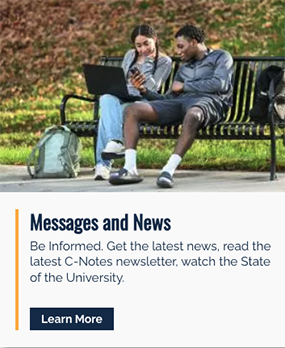
Did you know? Hover cards on desktop turn into sleek tile cards on mobile! (Everyone knows you can’t hover with a finger!) To keep things smooth for users across all devices, make sure every section is fully packed with info and that your call-to-action buttons are crystal clear. Those buttons are front and center in mobile view, so make them count in driving engagement!
Desktop version of hover image
Mobile version of hover image
Having trouble picking the right photos? Need access to Photoshelter (UTC’s online photo library)? Stuck on how to word something? Not sure if your grammar’s on point or if you’re following the university’s style? Don’t stress! The Division of Communications and Marketing crew has your back. Hit them up through their ticketing system or find all the answers you need online here. And for a quick refresher, check out the UTC editorial style guidelines. Let’s make sure everything is on point!
Layout Tips
In 2024, UTC’s website received approximately 15.5 million views, with nearly 5.5 million (about one-third) coming from mobile devices. When designing page layouts and structuring content, it’s crucial to consider all potential devices—mobile, desktop, and tablets. Last year, we even had some traffic coming from Smart TVs.
Content Editor Spotlight: Ethan Arnold
Meet Ethan Arnold, our Web Content Editor on the Web Team! A UTC senior majoring in Computer Science, you might have crossed paths with him on campus or through our ticketing system. Ethan works closely with faculty and staff to keep the university’s website fresh, functional, and user-friendly. He’s teamed up with several departments, including the Center for Women and Gender Equity, Chemistry and Physics, and the College of Engineering and Computer Science. These experiences have given him valuable insights into effective website management—everything from organizing pages and coordinating with departments to ensuring top-notch quality.
We’re excited to embark on this journey with you. Whether you’re a seasoned editor or just getting started, The Content Compass is your trusted guide for making every webpage the best it can be.
Feel free to reach out to us if you have any feedback! We look forward to hearing from you. In the meantime, happy editing!